
مدیریت ویژگیهای توسعهیافته
Original Bizagi title: Low-code Process Automation > Studio Cloud - Authoring environment > Bizagi Studio > Process wizard > Model Process > Documenting a process > Extending your documentation > Managing Extended Attributes
اتوماسیون فرایند Low-code / محیط طراحی Studio Cloud / Bizagi Studio / Wizard فرایند / مدلسازی فرایند / مستندسازی یک فرایند / گسترش و تکمیل مستندات / مدیریت ویژگیهای توسعهیافته
You can edit, remove or change the position of your Extended Attributes.
To manage Extended Attributes, just click them. A menu will be displayed on the right.
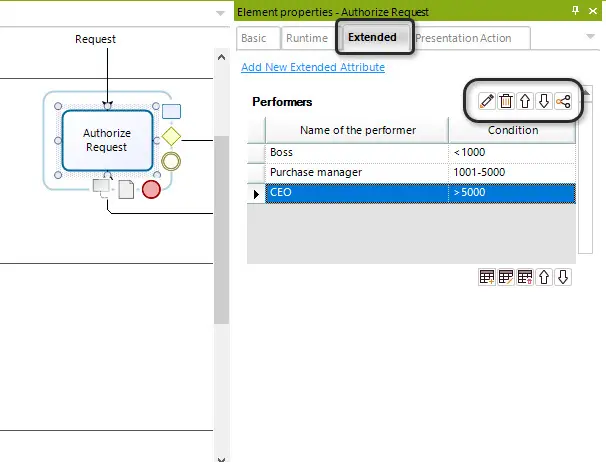
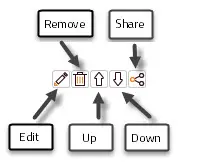
•The Edit button allows you to change the type, name and description of your attribute.
•The Remove button deletes the attribute. Note, once deleted you can not undo the action.
•The Up and Down buttons change the position of the attribute. This defines the order in which they are generated in your documentation.
The Share button allows you to share the attributes with elements that have different shapes.
Last Updated 7/5/2023 10:50:07 AM