
اشتراکگذاری ویژگیهای توسعهیافته بین المانها
Original Bizagi title: Low-code Process Automation > Studio Cloud - Authoring environment > Bizagi Studio > Process wizard > Model Process > Documenting a process > Extending your documentation > Sharing Extended Attributes between elements
اتوماسیون فرایند Low-code / محیط طراحی Studio Cloud / Bizagi Studio / Wizard فرایند / مدلسازی فرایند / مستندسازی یک فرایند / گسترش و تکمیل مستندات / اشتراکگذاری ویژگیهای توسعهیافته بین المانها
Once you have created an Extended Attribute it will be available for all the elements of the same type in the Model.
It is very common to need an Extended Attribute on several elements of different types.
You can share Attributes following the instructions below.
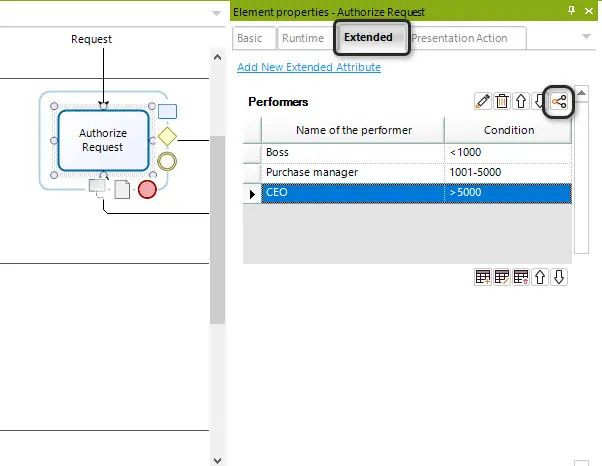
1. Select the diagram element, where the Extended Attribute was previously created, to open its properties, and select the Extended tab.
Click on the name of the Attribute that you want to share, and click the share button  .
.
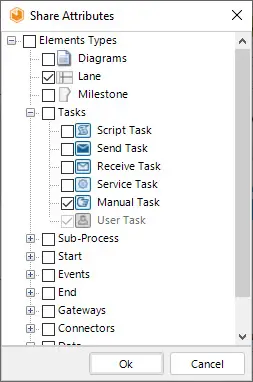
2. Select the structures, among which, you wish to share the Extended Attribute with. In this case we will share the Performers attribute with the Lane, Manual Task and User Task. After selection, click the OK button.
Last Updated 7/5/2023 10:50:16 AM