
مشاهده وابستگیهای Expression
Original Bizagi title: Low-code Process Automation > Studio Cloud - Authoring environment > Bizagi Studio > Process wizard > Business Rules > View Expression's dependencies
اتوماسیون فرایند Low-code / محیط طراحی Studio Cloud / Bizagi Studio / Wizard فرایند / Ruleهای کسبوکار / قواعد کسبوکار / مشاهده وابستگیهای Expression
Bizagi provides the View dependencies feature to verify if the expression is being used in actions, forms, process routing or allocation components; this option lists in a hierarchical way all the dependencies of the expression.
Example
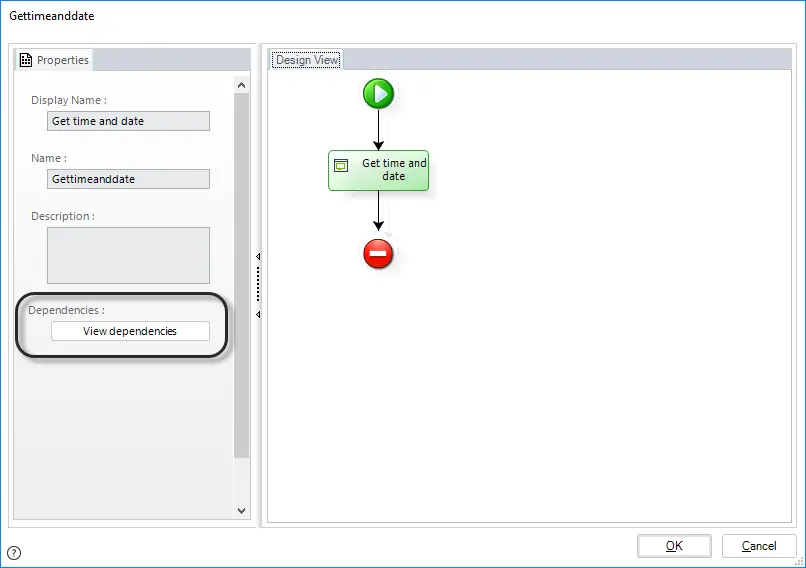
In the Library Management Process, a developer has created the expression Get time and date to obtain the current date and use it for default values in date time attributes. Because is a reusable expression, it can be used in several tasks. If you want to find where the expression Get time and date is being used, you can open the expression and click View dependencies.
All its dependencies are displayed in a hierarchical way grouped by the element type.
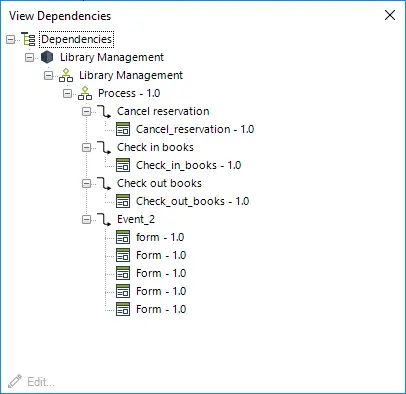
To open a given element, select it and click Edit. You can also double-click the desired element to open it.
Last Updated 1/6/2022 4:22:35 PM