
همگامسازی کاربران SCIM در Work Portal
Original Bizagi title: Low-code Process Automation > Studio Cloud - Authoring environment > Bizagi Studio > Authentication and other security definitions > Work Portal Security > Synchronizing users > Synchronizing users using SCIM's REST methods > Synchronizing users using Entra ID > SCIM user synchronization in the Work Portal
اتوماسیون فرایند Low-code / محیط طراحی Studio Cloud / Bizagi Studio / احراز هویت و سایر تعاریف امنیتی / امنیت Work Portal / پرتال کاری / همگامسازی کاربران / همگامسازی کاربران با استفاده از روشهای REST در SCIM / همگامسازی کاربران با Entra ID / همگامسازی کاربران SCIM در Work Portal
To configure the SCIM user synchronization in the Work Portal, follow the next steps:
Work Portal configurations
SCIM relies on the OAuth 2.0 protocol to authenticate Bizagi as a trustworthy application in Entra ID. Therefore, you need to create a Bearer Token from Bizagi Work Portal. Bear in mind that you need to generate this token for each environment where user synchronization between Entra ID and Bizagi is needed.
Bearer Token generation
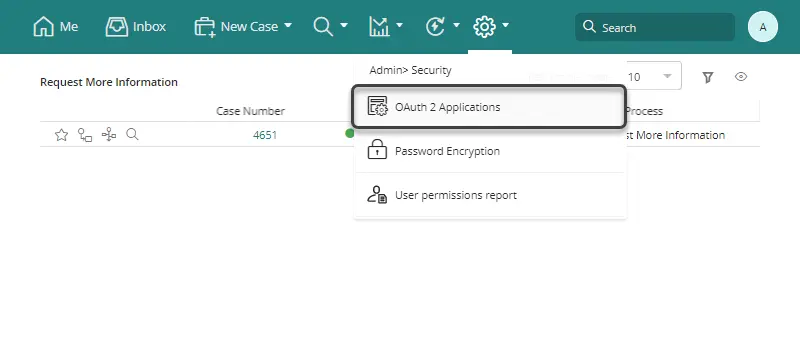
Open the Work Portal as a user with permissions to manage OAuth 2.0 Applications. Click the Admin menu, select the Security option, and then click OAuth 2.0 Applications:
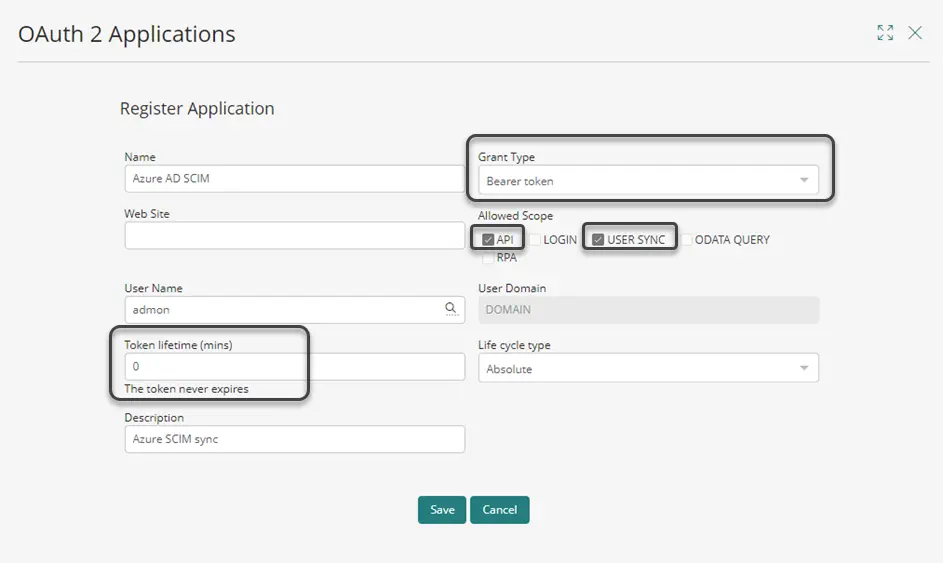
Add a new application by clicking the Add button. Then, create an application with the following properties:
•Grant type: Bearer token.
•Allowed scope: API and USER SYNC.
•Token lifetime: Set this parameter to 0 so the token never expires. Otherwise, you would need to reconfigure the Entra ID application everytime the token expires.
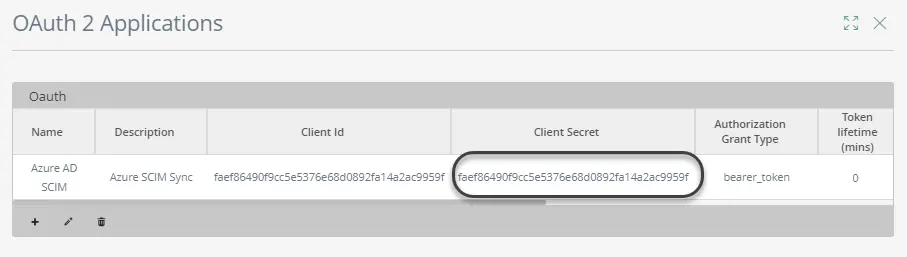
Copy the Client Secret as your token.
Then, continue with the Entra ID configurations for the Work Portal.
Last Updated 9/11/2024 10:24:54 AM