
غیرفعالسازی کاربر با REST
Original Bizagi title: Low-code Process Automation > Studio Cloud - Authoring environment > Bizagi Studio > Authentication and other security definitions > Work Portal Security > Synchronizing users > Synchronizing users using SCIM's REST methods > Getting started with user sync using REST > Deactivate a user using REST
اتوماسیون فرایند Low-code / محیط طراحی Studio Cloud / Bizagi Studio / احراز هویت و سایر تعاریف امنیتی / امنیت Work Portal / پرتال کاری / همگامسازی کاربران / همگامسازی کاربران با استفاده از روشهای REST در SCIM / شروع همگامسازی کاربران با استفاده از REST / غیرفعالسازی کاربر با REST
Users cannot be deleted in Bizagi. What you can do is deactivate a user, so this person cannot access the Work Portal any longer. To deactivate a user using the Bizagi SCIM you must use the service described in this article. The examples uses POSTMAN as the client, but you can invoke this service from any client compatible with RESTful services with OAUth 2.0 authentication.
Before continue, review the Getting started with the synchronization procedure section.
Resource URL
[Project_URL]/scim/v2/Users/{username}
HTTP Method
DEL
Authorization
OAuth 2.0
Input
The username or ID ( guidUser from the WFUser table) sent in the URL.
URL Example:
[Project_URL]/scim/v2/Users/MarkW
This deactivates the user MarkW. If you have multiple domains you can send this parameter using this format:
userName@domain
The final execution in POSTMAN looks like this:
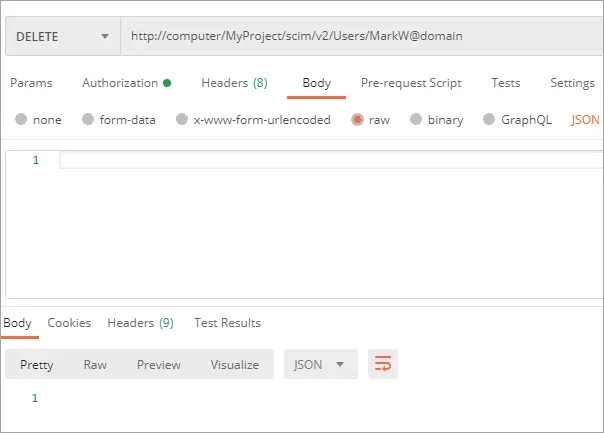
There is no JSON response for this method. In Bizagi this user is deactivated after the service is invoked:
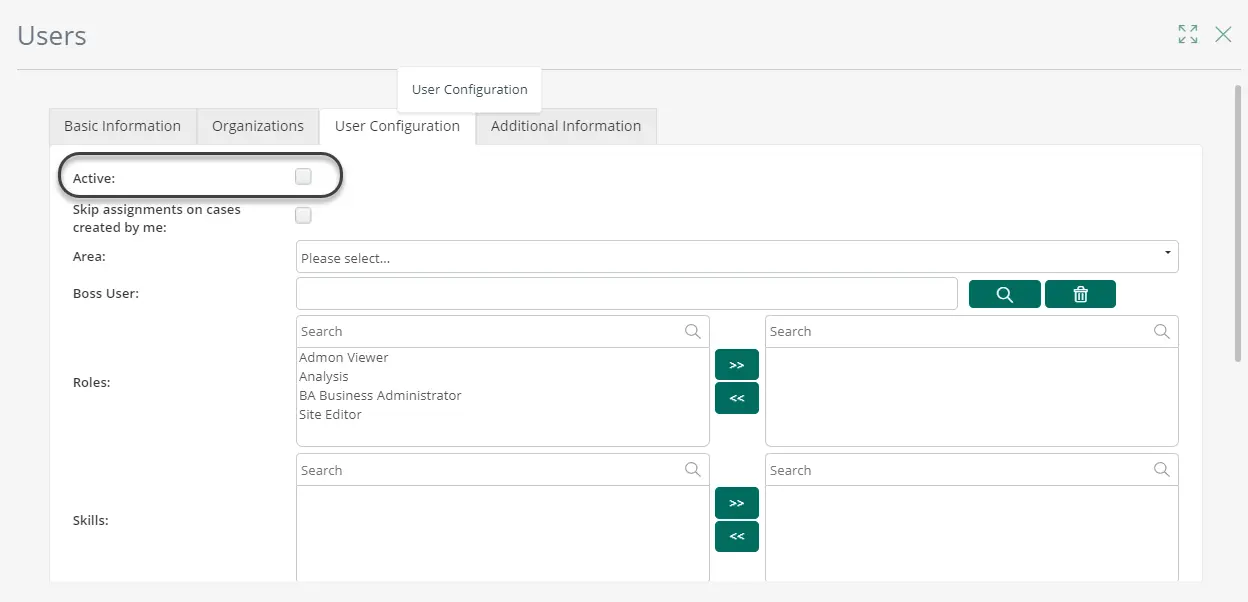
|
You can also deactivate a user updating the active parameter. See how to update user information. |

Last Updated 1/6/2022 4:58:28 PM