
تابع Power / توان
Original Bizagi title: Low-code Process Automation > Studio Cloud - Authoring environment > Bizagi Studio > Process wizard > Business Rules > Business Rules examples > Math operations, strings and data validations > Perform Math operations > Power
اتوماسیون فرایند Low-code / محیط طراحی Studio Cloud / Bizagi Studio / Wizard فرایند / Ruleهای کسبوکار / قواعد کسبوکار / مثالهای Ruleهای کسبوکار / , داده اعتبارسنجی ها / انجام عملیات Math / ریاضی / تابع Power / توان
This function obtains the result of a number raised to a power.
The parameters of this function can be defined as Xpaths, variables or numbers.
Considerations
•Input parameters must be double.
•The supported attribute types to use as input XPath parameter (or Xpaths stored in variables) are: integer, currency, float, real.
•The function returns an error if the Base is between 1 and -1 and the Power is either too long or negative number.
•The function returns an error if the Base is either too long and the Power is greater than zero.
•The function returns an error if the Base is negative and the Power is not integer.
•The function returns an error if the Base is not between 1 and -1 and Power is too long.
•The function returns an error if the Base is zero and the Power is negative.
•The function returns an error if the Base or Power are undefined.
•Use the IsNaN function to validate the parameters used are numbers.
Example
In a Credit Request Process a customer wishes to know what would be the total amount that he/she has to pay in a Personal loan after six months under a given interest rate.
This amount can be calculated using the following formula:

Where Po is the requested amount, i is the monthly interest rate and P is the amount at the month n.
To perform this calculation in Bizagi you can use the Power function. This function receives two parameters: Number and power.
As the requested amount and interest rate are known, the final amount can be easily calculated as follows:
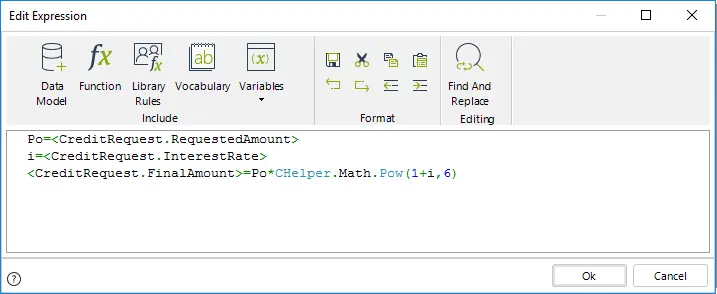
//Obtain the parameters of the formula in variables
Po=<CreditRequest.RequestedAmount>
i=<CreditRequest.InterestRate>
//Apply the formula to obtain the final amount
<CreditRequest.FinalAmount>=Po*CHelper.Math.Pow(1+i,6)
Last Updated 1/6/2022 4:19:54 PM