
تابع Floor / گرد کردن به پایین
Original Bizagi title: Low-code Process Automation > Studio Cloud - Authoring environment > Bizagi Studio > Process wizard > Business Rules > Business Rules examples > Math operations, strings and data validations > Perform Math operations > Floor
اتوماسیون فرایند Low-code / محیط طراحی Studio Cloud / Bizagi Studio / Wizard فرایند / Ruleهای کسبوکار / قواعد کسبوکار / مثالهای Ruleهای کسبوکار / , داده اعتبارسنجی ها / انجام عملیات Math / ریاضی / تابع Floor / گرد کردن به پایین
This function rrounds a number down.
The parameter of this function can be defined as an XPath, variable or number.
Considerations
•The input parameter must be double.
•The supported attribute types to use as input XPath parameter (or Xpaths stored in variables) are: integer, currency, float, real.
•Use the IsNaN function to validate the parameter is a number.
Example
In a Purchase Request Process an estimation of the price of a product is made based on the last three purchases of that product. The purchasing values are averaged to obtain the estimation. The Purchase department has decided to round this estimation down to obtain an integer estimation. For this case the Floor function can be used:
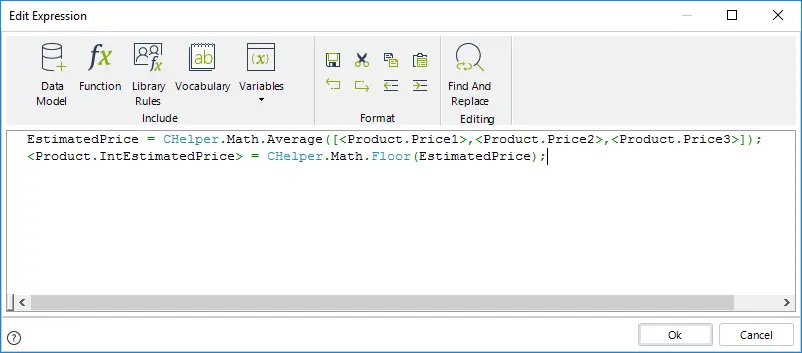
//Obtain the estimated price by averaging the last three purchasing prices
EstimatedPrice = CHelper.Math.Average([<Product.Price1>,<Product.Price2>,<Product.Price3>]);
//Obtain the integer part of the estimated price
<Product.IntEstimatedPrice> = CHelper.Math.Floor(EstimatedPrice);
Last Updated 1/6/2022 4:19:20 PM