
تابع Absolute Value / قدر مطلق
Original Bizagi title: Low-code Process Automation > Studio Cloud - Authoring environment > Bizagi Studio > Process wizard > Business Rules > Business Rules examples > Math operations, strings and data validations > Perform Math operations > Absolute Value
اتوماسیون فرایند Low-code / محیط طراحی Studio Cloud / Bizagi Studio / Wizard فرایند / Ruleهای کسبوکار / قواعد کسبوکار / مثالهای Ruleهای کسبوکار / , داده اعتبارسنجی ها / انجام عملیات Math / ریاضی / تابع Absolute Value / قدر مطلق
This function returns the absolute value of a number.
The parameter of this function can be defined as an XPath, variable or a number.
Considerations
•The input parameter must be double.
•The supported attribute types to use as input XPath parameter (or Xpaths stored in variables) are: integer, currency, float, real.
•The function returns error if evaluates an undefined parameter.
•Use the IsNaN function to validate the parameter used is a number.
Example
In an Expenses report Process an employee registers all the expenses of a business trip. If the expenses are higher than the approved ones, the difference has to be discounted from payroll. As this difference is always negative but the amount to discount has to be positive it is necessary to use the Abs function:
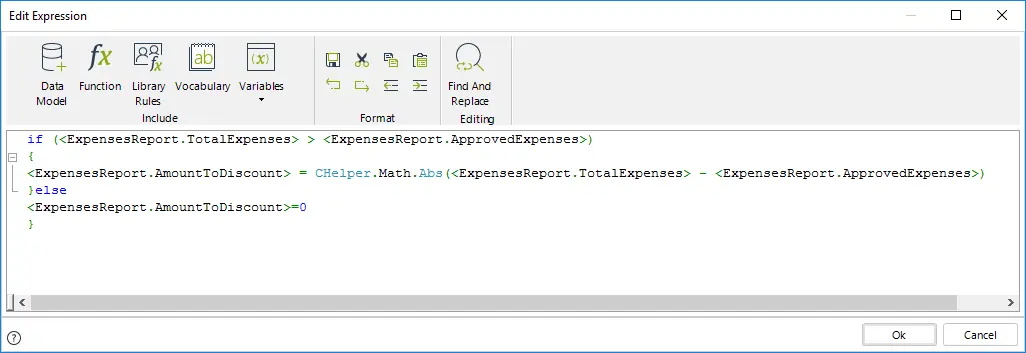
//Evaluate if the registered expenses are greater than the approved ones
if (<ExpensesReport.TotalExpenses> > <ExpensesReport.ApprovedExpenses>)
{
//If so obtain the absolute value of the difference
<ExpensesReport.AmountToDiscount> = CHelper.Math.Abs(<ExpensesReport.TotalExpenses> - <ExpensesReport.ApprovedExpenses>)
}else{
//If not assign 0 to the amount to discount from payroll
<ExpensesReport.AmountToDiscount>=0
}
Last Updated 1/6/2022 4:19:04 PM