
روش بهدستآوردن wfClassName
Original Bizagi title: Low-code Process Automation > Studio Cloud - Authoring environment > Bizagi Studio > How To's > Useful how-to's > How to obtain Bizagi parameters > How to obtain wfClassName
اتوماسیون فرایند Low-code / محیط طراحی Studio Cloud / Bizagi Studio / راهنماهای عملی / How To / راهنماهای عملی مفید / راهنماهای کاربردی / روش بهدستآوردن wfClassName
When working in a Bizagi Studio project to automate processes, you may find yourself using some of Bizagi functions and methods. Some of them may have a parameter named wfClassName. This section shows you how to obtain this value.
What you need to do
To find out your process's work flow class name, follow these steps:
1. Go to Expert view
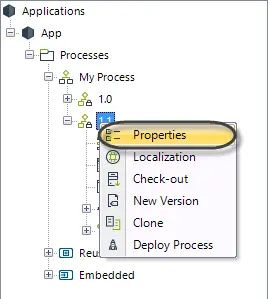
On the Processes tab, right click your process's latest version. Select properties.
2. Obtain your process's wfClassName
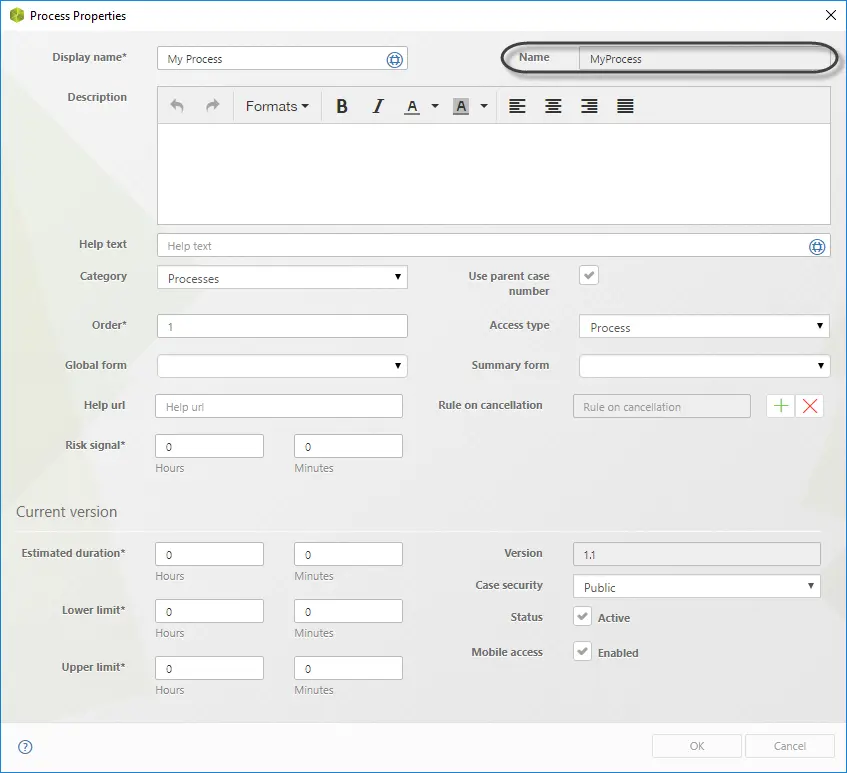
Your process's wfClassName is on the Process Properties window by the tag Name.
Last Updated 1/6/2022 5:19:55 PM