
حذف فایل بارگذاریشده
Original Bizagi title: Low-code Process Automation > Studio Cloud - Authoring environment > Bizagi Studio > Process wizard > Business Rules > Business Rules examples > Documents and files > File management with expressions > Delete an uploaded file
اتوماسیون فرایند Low-code / محیط طراحی Studio Cloud / Bizagi Studio / Wizard فرایند / Ruleهای کسبوکار / قواعد کسبوکار / مثالهای Ruleهای کسبوکار / فایل ها / مدیریت فایل با Expressionها / حذف فایل بارگذاریشده
In Bizagi, you may delete the content of File-type attributes without an end user's intervention using an expression.
For example, in a Loans Request Process the Process Entity is called Request. Assume in this entity there is a File-type attribute called HistoryFile that will store documents that are attached in several activities of the Process.
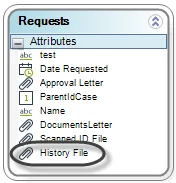
To delete the uploaded files use this statement:
Me.deleteAllCollectionItems("Request.HistoryFile");
DO NOT USE this statement as THE VALUE OF THE UPLOADED FILE WILL REMAIN UNCHANGED:
Me.setXPath("Request.HistoryFile", null)
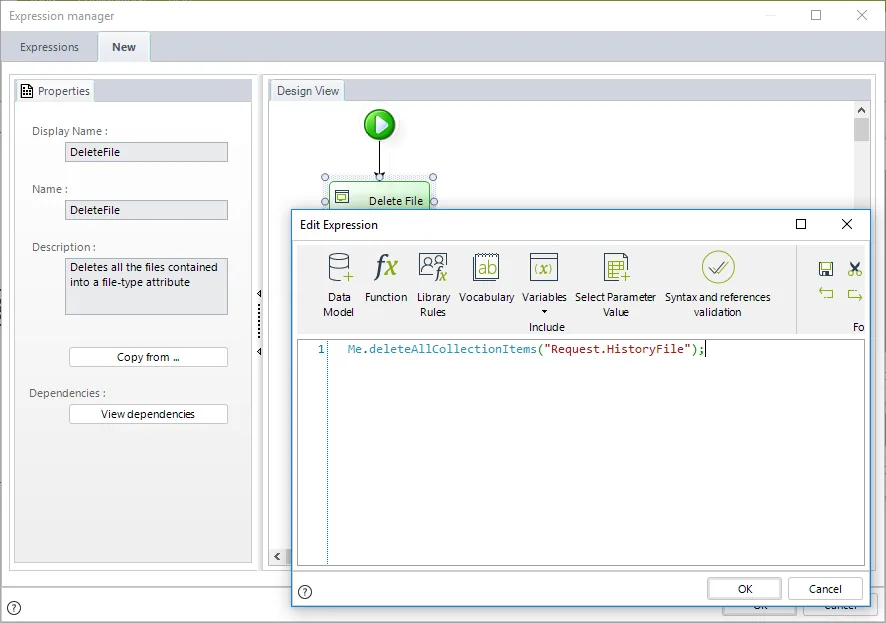
Note this expression is similar to the ones used to delete records to a collection. This is because file-type attributes are treated as a collection of files, for this reason you can store many files in a single attribute.
Last Updated 1/6/2022 4:17:53 PM