
Automation Anywhere: Authenticate
Original Bizagi title: Low-code Process Automation > Studio Cloud - Authoring environment > Bizagi Studio > Bots > Automation Anywhere bot integration > Automation Anywhere Metabot > Automation Anywhere: Authenticate
اتوماسیون فرایند Low-code / محیط طراحی Studio Cloud / Bizagi Studio / Botها / رباتها / یکپارچهسازی Bot با Automation Anywhere / Automation Anywhere Metabot / Automation Anywhere: Authenticate
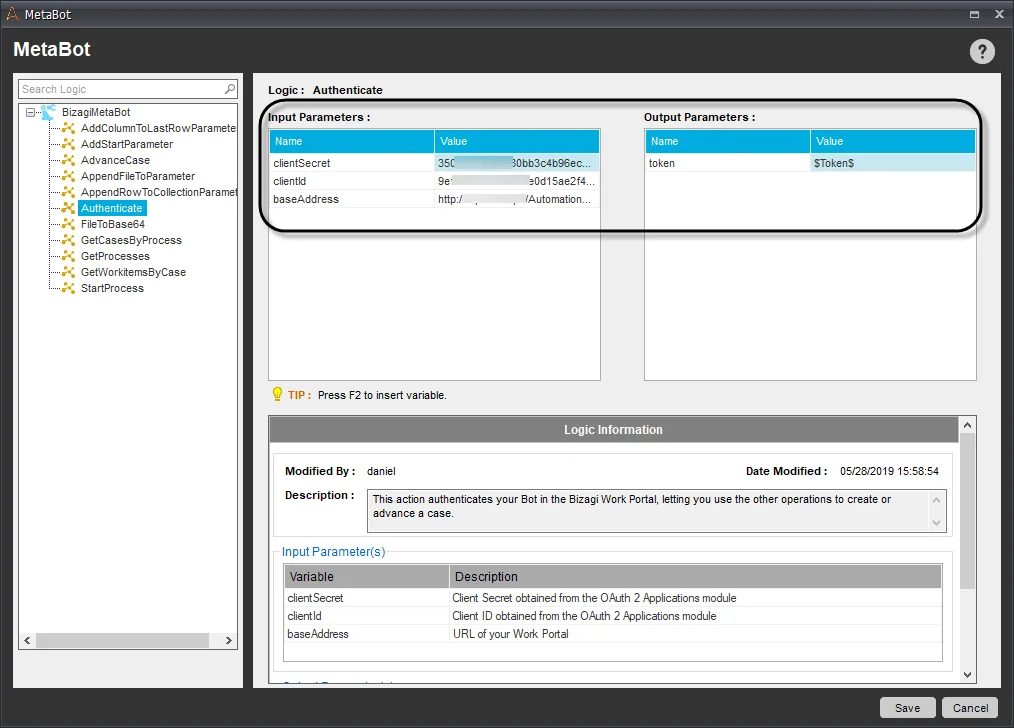
This operation authenticates your Bot in the Bizagi Work Portal, letting you use the other methods to create or advance a case. It returns a token, save it since other operations required it. This action is very important since it lets Bizagi identify that the bot is an authorized user to execute the operations.
Inputs
•baseAdress: URL of your Work Portal.
•clientId: Client ID obtained from the OAuth 2 Applications module.
•clientSecret: Client Secret obtained from the OAuth 2 Applications module.
|
To obtain your client ID and Client Secret follow the steps described at Getting started |

Output
•token: Token used by the other methods to authenticate the bot.
Important considerations
1.Save the token output since it is necessary for the following operations:
2.Each token has a lifetime defined in the OAuth 2 Applications module of the Work Portal this lifespan must be long enough to guarantee that the bot task is completed successfully.
Last Updated 2/11/2022 9:15:47 AM